
Pallyy review: Is this social media scheduler worth it?
What I love, what I’d change, and who this scheduler is actually best for. ♡

If you’ve ever had a client approve a post over text, forgotten to tag a collaborator on a post, or missed an important comment on a post, this Pallyy review is for you. After eight years of testing different social media schedulers, I’m sharing my honest review on Pallyy: what I love, what I’d change, and who this scheduler is actually best for.
The tool is so refreshingly simple and intuitive. I’m excited to share more!
TL;DR – The Key Takeaways
Pallyy is an affordable “all in one” social media scheduler that’s ideal for freelancers and small agencies who manage multiple brands.
You can do almost everything without posting manually, including adding collaborators, hashtags in the first comment, product tags, location, and repeat posts. It also has a live Instagram grid preview, custom analytics with a “best time to post” calendar, competitor tracking, a shared inbox where you can assign comments, a custom link in bio, and client approvals.
Because Pallyy charges per brand rather than per channel, it’s much cheaper than schedulers like Sprout Social, Later, or Hootsuite. The “downside” is fewer bells and whistles; however, I much prefer a scheduler that prioritizes simplicity and performance rather than complexity and advanced features.
Overall, I would rate Pallyy a 9/10!
If you are a freelance social media manager, solo creator, or an agency juggling multiple brands, your current desktop probably looks like a madhouse of open tabs and Canva templates. Pallyy puts everything you need into an interface that takes minutes to master.
But before we get into a detailed review, here are the basics of what you should know:
Pallyy At A Glance
What Is Pallyy?
Pallyy is a social media scheduler for marketing agencies managing multiple brands! It’s truly an “all in one” platform that covers content scheduling, analytics (with competitor tracking), community management, client approvals, and a link in bio.
What platforms are included in Pallyy?
Basically any social media platform you could need. Right now, you can post to Instagram, Facebook, X, LinkedIn, Google Business Profile, Pinterest, TikTok, YouTube, Threads and even Bluesky.
What is Pallyy’s pricing?
At the time I’m writing this in 2026, they do offer a free plan for one brand which includes 15 scheduled posts and image posts only. Many features are only for paid users. The free plan is great to give the platform a basic test, but isn’t a great plan to stay on long term. The other plans are:
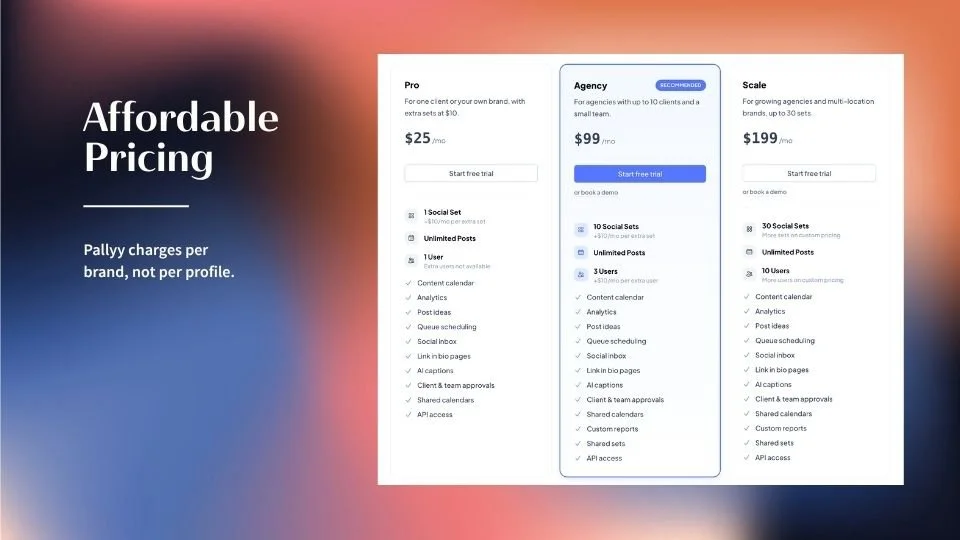
Pro: $25/month for 1 brand, plus $10 per month for each additional brand
Agency: $99/month for 10 brands and 3 team members
Scale: $199/month for 30 brands and 10 team members
One thing I love is that Pallyy charges per brand (not per profile), so one client’s Instagram, Facebook, and TikTok count as just one social set.
Who is Pallyy best for?
Freelancers and small agencies who work with multiple brands, especially those that need client approvals and an aesthetic grid.
Who is Pallyy not the best fit for?
If the brands you manage have multiple social media pages, this may not be the best fit. For example, we used to manage socials for a pest control company that had 40+ locations, each one having their own Facebook page. On Pallyy, this would be $400+.
How does Pallyy compare to other social media schedulers?
Compared to popular platforms like Sprout Social, Later, and Hootsuite, Pallyy’s pricing is considerably cheaper. While Pallyy may not have as many features as a platform like Sprout Social, I have never felt that the juice is worth the squeeze with a large platform like Sprout Social. I much prefer a platform like Pallyy that has everything you need and nothing you don’t.
Compared to smaller platforms like Gain App and HeyOrca, Pallyy offers more features at a similar price. It also seems that Pallyy responds faster to API changes (which is so important in the ever changing world of social media).
What makes Pallyy, Pallyy?
I’m glad you asked. Here are some of my favorite parts:
🙅♀️ 1. No need to manually publish posts
🫣 2. Track competitors
📈 3. Prioritize both metrics and aesthetics
🗣️ 4. Stay on top of comments + DMs
💸 5. Save you and your clients $$$
✅ 6. Create a seamless approval workflow
The moment I first opened the interface, it was like a breath of fresh air. As the owner of a social media agency, I’ve used a lot of tools over the years, and I would consider switching our entire company to this platform.
If you’re still considering trying out a new scheduler, here’s my detailed Pallyy review ↓
The Detailed Pallyy Review 👇
1. No Need To Manually Post
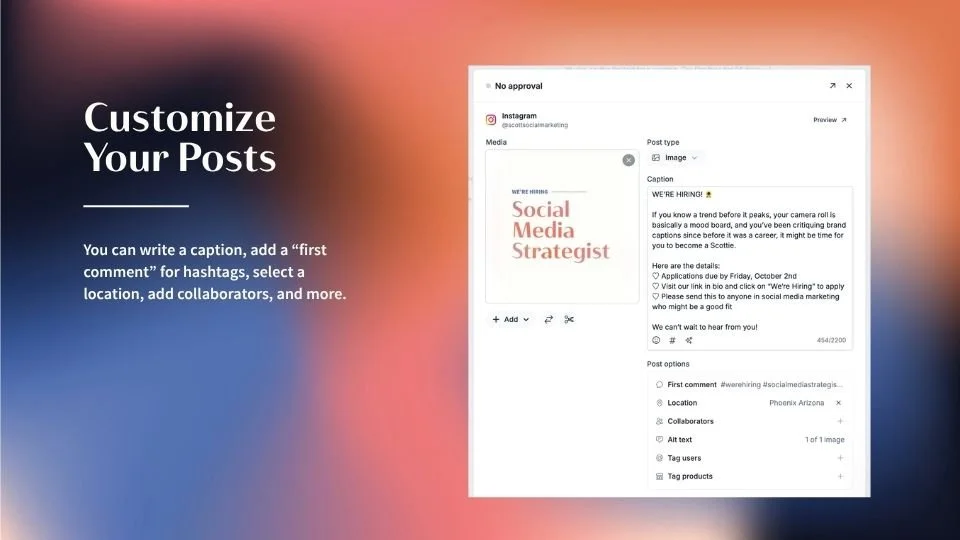
If your current social media scheduler doesn’t allow you to add music, a collaborator, hashtags in the first comment, product tags, and more, you already know the drill – it has to be posted manually.
What I love about Pallyy is that they offer so many post customizations, there are hardly any instances where a post needs to be optimized in the native social media app. Almost everything can be done in the Pallyy platform itself!
Constructing a post on Pallyy is intuitive and unique. It is simple to write the caption, add a “first comment” for hashtags, select a location, add collaborators, and more. Pallyy is the first lesser-known interface I have seen with the option to add collaborators! Pallyy even has a “hashtags list” feature, making it easy to use the same group of hashtags for multiple posts. You can also search Instagram’s audio library and attach a song or sound to your Reel.
Pallyy also has a repeat feature! While we don’t repeat posts for all clients, for the ones with Pinterest, top performing posts, or have the need for A/B testing multiple variations of the same post, this feature is amazing.
Last, for e-commerce clients, you can even tag products, making Pallyy ahead of the curve.
2. Competitive Much?
I don’t know about you, but I love stalking, I mean tracking, competitors.
You simply add the profiles you want and Pallyy shows you their posts next to yours, complete with likes, comments and engagement rates.
The downside is that competitor tracking is only available for Instagram at the moment. I would love to see all platforms become available, especially Facebook and TikTok, since Instagram isn’t every brand’s primary platform.
3. Aesthetics That Marry Metrics
Worried about how a new post will look on an Instagram feed? Pallyy gives you a live Instagram grid where you can see your scheduled post and existing posts side by side. This feature eliminates the guesswork and ensures your brand aesthetic stays completely flawless.
But, aesthetics are only one part of the picture. Luckily, Pallyy helps agencies balance between aesthetics and metrics. Plus, let’s be honest, how many times do you check your posts’ engagement each day?
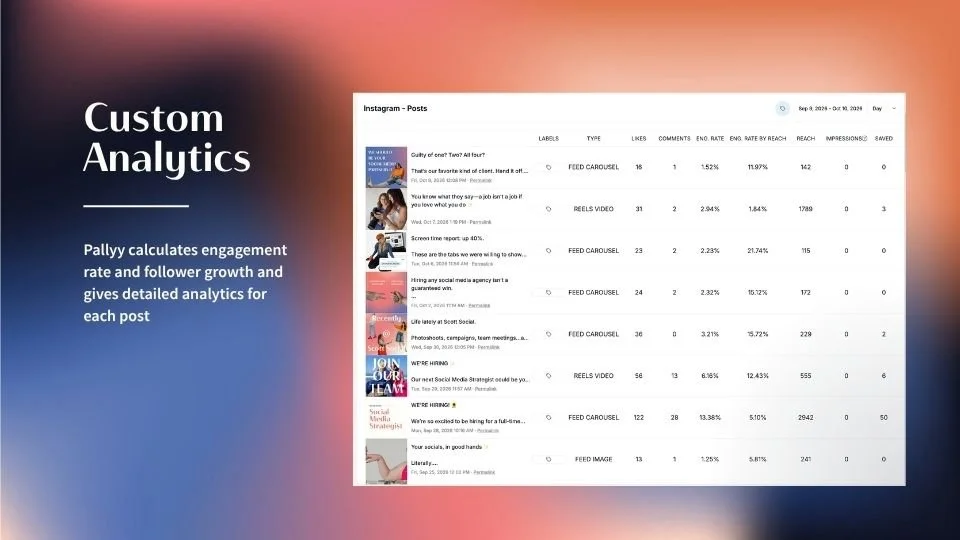
Pallyy makes analytics detailed yet simple to navigate. Pallyy calculates engagement rate and follower growth and gives detailed analytics for each post. The profile section gives you everything you want to see about your audience.
Pallyy created something new and genius with their “best time to post” calendar. The analytics nerd in me loves this. The only downside is that the “best time to post” calendar isn’t visible when you’re actually creating the posts. I would love to see this as a feature!
And if they don’t have a report that fits your needs? You can create your own custom reports
4. Stay On Top Of Comments + DMs
Community management is the necessary evil of social media.
Luckily, the Pallyy inbox feature makes it easy to do everything in one area. My favorite feature is that you can assign comments to specific team members and mark them as “complete”. In the past, we’ve struggled with missing comments on old posts, so this feature makes sure you don’t miss a beat.
5. Save You + Your Clients $$$
I hinted at this earlier, but the pricing structure of Pallyy is unparalleled. I’m not a fan of paying top dollar for platforms like Sprout Social that overcharge and underdeliver. Pallyy is one of the most cost effective schedulers I’ve tested so far, but doesn’t compromise on features.
On the client side, our brands usually pay for their own “link in bio” feature separately, but Pallyy has it included, meaning we could offer this as a service. Such a great value add.
6. Create A Seamless Approval Workflow
And last but not least, approvals. Having approval functionality in a social media scheduler is a must for me! Streamlined approvals keep conversations organized, limit email communication, and save both us and our clients a lot of time.
Clients can approve their posts through a shared calendar link and don’t need their own account (which means you don’t have to add clients as paid team members). To contrast, platforms like Sprout Social make you pay per user, even if they’re just an approver. Pallyy is leaps and bounds ahead of them in this aspect!
Overall…
My Pallyy review is a very positive one. It’s a yes for me! A 9/10.
I would recommend Pallyy and I have used more content schedulers than I’d like to admit. If you’ve tried out Pallyy, or other social media schedulers, let me know. I always love exploring a new tool.

WRITTEN BY:
Chelsea Flower
Founder of Scott Social