Because isn’t that the goal?
AI tools for editing Reels have gotten really good. They can add captions, cut awkward pauses, find your best clips, resize videos, and turn long-form content into Reels in no time.
As a social media agency that edits Reels every day, we’re here for anything that makes the tedious parts faster. And trust us, there’s plenty of tedious stuff we’re happy to hand over.
The catch? Faster editing doesn’t mean better content. AI can make your Reel look cleaner, but it can’t guarantee anyone will stop scrolling long enough to care about it.
So before you leave your content to the robots, let’s talk about what they can (and can’t) do.
Here are the top five AI Reel editing tools worth considering, what they do best, and where we think the human touch still wins.

5 Best AI Tools for Editing Reels (& What They’re Good At)
Most AI video editing tools promise some version of the same thing: faster edits, better content, less work.
The “best” one mostly depends on what’s slowing you down. Need captions? Want to pull clips from a podcast? Just really, really don’t want to spend your afternoon making cuts?
Here are five of the best AI tools for editing Reels worth considering:
CapCut: Best All-Around AI Reel Editor
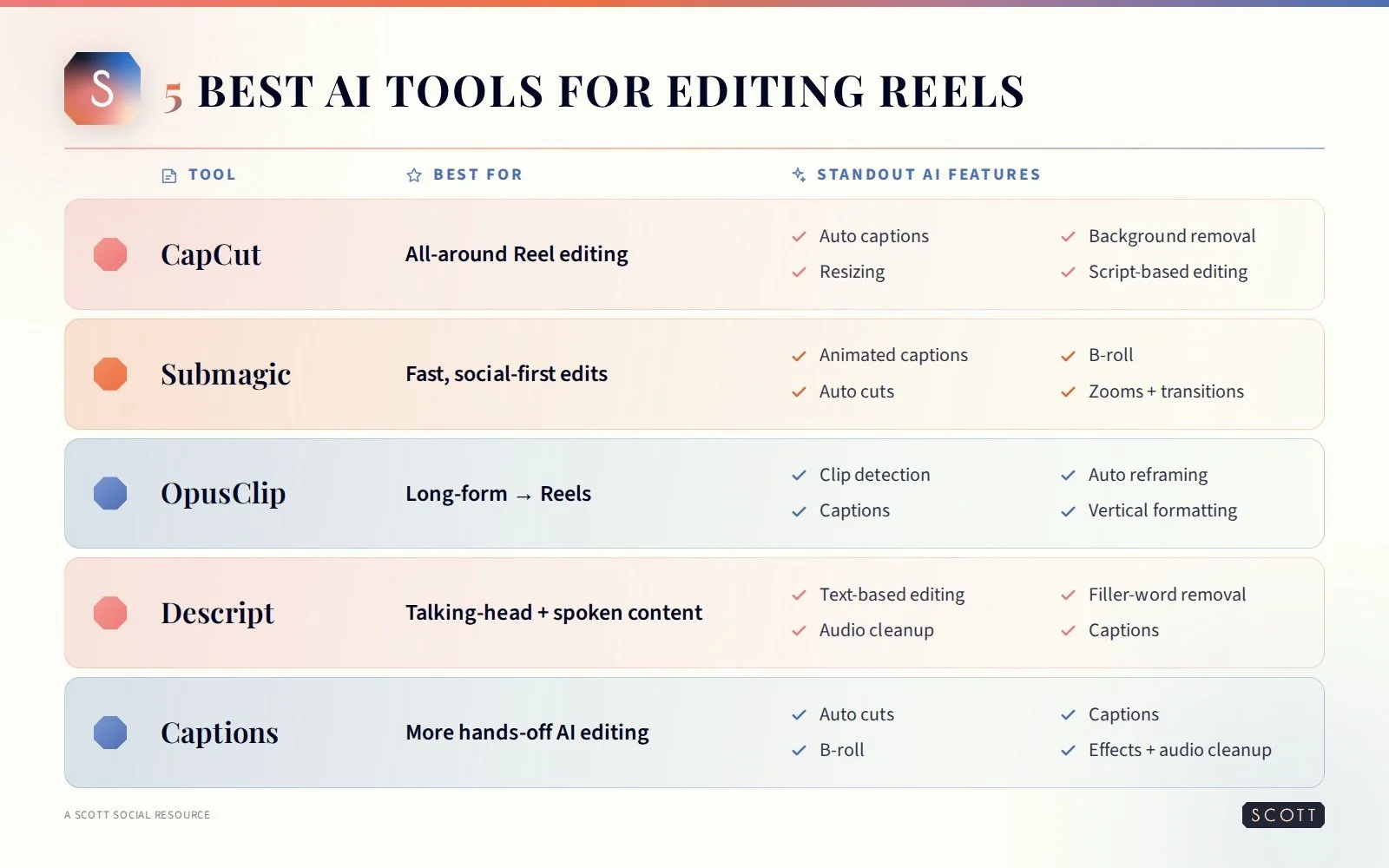
CapCut is the tried-and-true platform we all know and love. It combines a traditional video editor with AI features that can handle everything from automatic captions and background removal to resizing and script-based editing. You still have plenty of control over the finished product, so it’s a solid choice when you want AI to speed things up without taking over the edit.
How it helps: Automates captions, background removal, resizing, cleanup, and other repetitive editing tasks.
Best for: Creators and brands looking for one versatile tool to edit Instagram Reels from start to finish.
Submagic: Best for Captions + Social-First Edits
If the animated captions, punchy zooms, and fast cuts you see all over your feed are exactly what you don’t want to add manually, meet Submagic. It’s built for short-form content and can automate captions, remove silences, add B-roll, highlight keywords, and give footage a more polished social-first edit.
How it helps: Speeds up captions, cuts, B-roll, transitions, zooms, and other common short-form editing elements.
Best for: Talking-head Reels and creators who want social-ready edits without manually adding every effect.
OpusClip: Best for Turning Long-Form Videos Into Reels
Have a 45-minute podcast and zero desire to scrub through the whole thing looking for a 30-second clip? That’s OpusClip’s sweet spot. Its AI analyzes longer videos, finds potentially engaging moments, and turns them into short vertical clips you can repurpose for social. It can also reframe speakers, add captions, and format clips for platforms like Instagram.
How it helps: Finds potential short-form moments inside longer videos and automatically turns them into vertical clips.
Best for: Podcasts, interviews, webinars, YouTube videos, and brands sitting on a goldmine of long-form content they aren’t repurposing (but should be).
Descript: Best for Talking-Head + Spoken Content
Descript takes a different approach to AI video editing. Instead of dragging tiny clips around a timeline, you can edit your video by editing the transcript. Delete a sentence from the text and it disappears from the video, too. It can also remove filler words, clean up audio, generate captions, and make longer conversations easier to trim down into usable content.
How it helps: Lets you edit video through text while speeding up filler-word removal, captions, audio cleanup, and rough cuts.
Best for: Educational Reels, interviews, podcasts, tutorials, and other dialogue-heavy content.
Captions: Best for Letting AI Handle More
Captions is probably the closest option on this list to saying, “Here’s my footage. You deal with it. I’m out.” Its AI editing features can make cuts, add captions, incorporate B-roll, add transitions and zooms, clean up audio, and make other editing decisions automatically. It’s honestly a pretty impressive example of how far AI Reel editing has come in the last few years.
How it helps: Automates multiple parts of the editing process at once, from captions and cuts to visual effects and B-roll.
Best for: Creators who want to spend as little time as possible manually editing simple short-form videos.
But Wait, Because Editing the Reel Is Only Half the Job
AI tools can save you a ton of editing time, but do you see the pattern in what they’re good at?
Working with content you’ve already created.
Can AI find clips and remove pauses? Absolutely. Can it clean up your footage and add captions afterward? Sure thing.
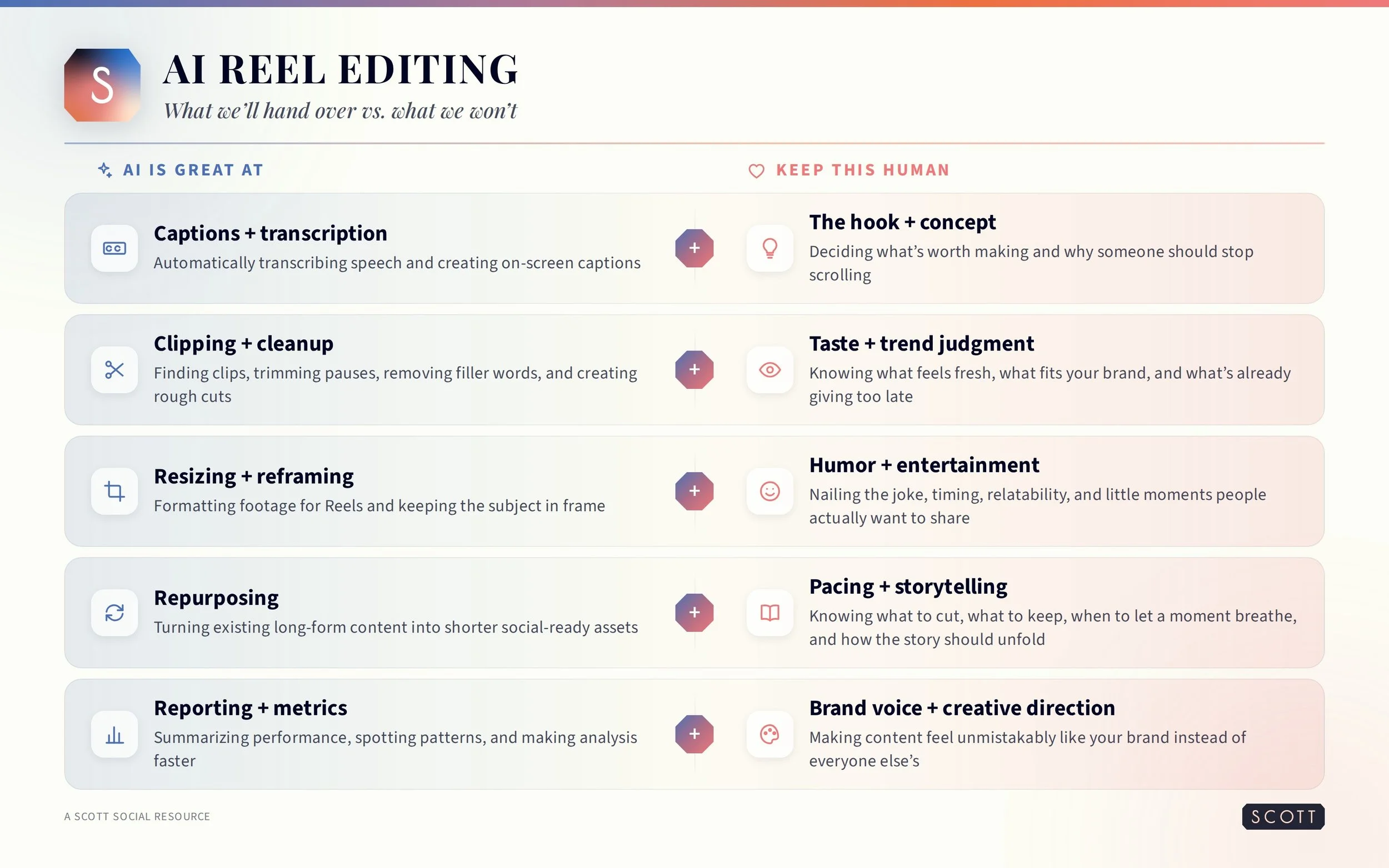
What it can’t do is decide what your Reel should be about, what the hook is, which trend fits your brand, or why your audience would want to watch.
That’s content development, which is a very different job from video editing.
A great edit can make a good idea even better, but perfectly timed clips can’t rescue a Reel that wasn’t interesting to begin with. And we say that with love.
Can AI Edit Reels? Yes, But It Can’t Do This One Thing
AI can edit Reels, but it can’t make people care about them.
People are on Instagram to be entertained, and that takes more than clean cuts and captions.
Humor, timing, storytelling…that all takes taste. And AI still can’t outperform humans in taste.
It’s also way better at repeating a formula than creating one. If you already know the hooks, formats, humor, and content styles your audience loves, AI can help you execute them faster.
If you don't, asking AI to “make a viral Reel” is more likely to result in a bland copy of what everyone else is already doing.
Our honest take? AI can help you repeat a winning formula, but it can’t give you the winning formula in the first place.
How We Use AI at Scott Social
Plot twist: we use AI, too. We just stick to giving it the jobs it’s actually good at.
AI helps us speed up repetitive editing tasks, dig through reporting, spot patterns in performance, and summarize metrics faster.
That gives our team more time for the work we want humans doing: concepts, hooks, storytelling, humor, trend judgment, and making sure the content sounds and feels like the brand behind it.
For us, AI is a tool in the process, not the creative director or video editor. And that’s exactly how it should be.
The Real Cost of DIY-ing Your Reels With AI
If all you need is help editing, AI is going to save you money (and probably a decent chunk of time). We’re social media pros, and even we happily hand off the mundane stuff when a great tool can do it faster.
But we also know how much happens before and after the edit. There’s brainstorming what to post, watching for trends that fit your brand, writing hooks, filming, reviewing the edit, posting, checking performance, and using what worked to plan the next round of content.
AI can shorten that list, but it doesn’t make the list disappear. (If only.)
So if editing is the part eating up your time, use the tool! If you’re tired of managing the whole content process, that’s a different kind of help than an AI editor can give you.
And that’s where social media agencies like Scott Social can step in and take the reins.
Using AI to Edit Instagram Reels: What to Know
-
Yes. AI can add captions, make cuts, resize footage, remove pauses, and more. What it can’t reliably replace is the creative strategy behind the Reel.
-
Our top picks are CapCut, Submagic, OpusClip, Descript, and Captions. The right choice depends on whether you need general editing, captions, repurposing, or more automated edits.
-
AI will automate more repetitive editing tasks, but concepts, storytelling, humor, brand voice, and creative judgment still benefit from a human behind them.
-
Yes. We use AI for mechanical tasks, reporting, metrics, and analysis while keeping content development, creative direction, humor, and strategy 100% human-led.
-
It depends. AI works well for basic editing, but professional support makes more sense when you also need concepts, strategy, trends, and creative direction.
Ready to Hand Over the Reels? We’ve Got You!
We love a shortcut as much as anyone, and AI tools like CapCut and OpusClip can trim hours off your editing process. But the best Reels still start with a great strategy, so don’t outsource the part that makes your content worth watching.
At Scott Social, we plan the content, develop the ideas, keep up with the trends, create the Reels, and pay attention to what’s working so your social strategy keeps getting smarter.
AI helps us do some of that work faster, but our women-led team is what makes it feel like you.
If what you really want is fewer tools to manage and a social team who already knows what to do with them, we’d love to work with you. Let’s get social. ♡