Best Ways To Use the Canva Magic Eraser Tool
Canva Magic Eraser: Not sponsored, just obsessed
Remember that time you painstakingly Photoshopped your ex out of your vacation pics? (Just us?) In short, Canva Magic Eraser is pretty much that energy. But for your brand content. And way less emotionally charged.
This AI-powered tool is a game-changer for brands. In sum: quick, professional photo edits without the headache of complex software. You can remove photobombers from product shots. Or clean up messy backgrounds for social posts. In other words, Canva Magic Eraser makes it stupid easy.
Best Ways To Use the Canva Magic Eraser Tool
Remove Distracting Objects From Product Photos
You know that feeling when you snap the perfect product photo. But there’s a random coffee cup in the background? Annoying, right?
The Canva Magic Eraser tool lets you brush over unwanted objects. And then POOF, they’re gone.
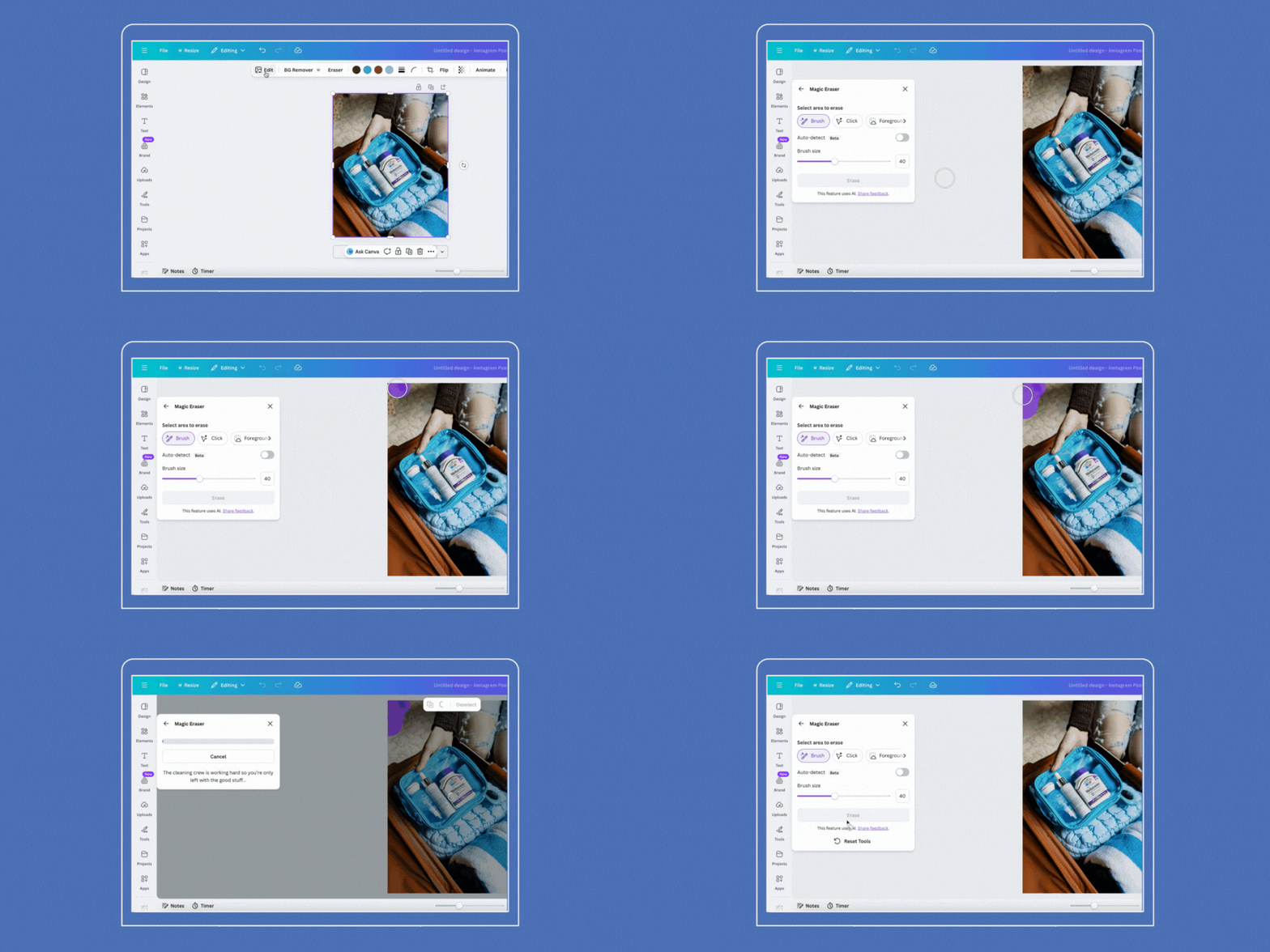
You can access it by:
Selecting your image
Clicking “Edit Photo”
Then choose “Magic Eraser” under Magic Studio
You can either click specific objects or use the brush tool to paint over areas you want to remove.
Pro tip: Zoom in for precision work. The closer you get, the better your results will be. Even more so for small details that need finessing.
Clean Up User-Generated Content
UGC is a chef’s kiss for authenticity. But sometimes those customer photos need a cleanup before they’re ready for your grid.
Perhaps there’s a distracting logo in the background. Or an unwanted element that diverts attention from your product. Magic Eraser handles these scenarios like a pro. It lets you maintain that authentic vibe. All while keeping your feed looking polished and intentional.
In short, this is huge for brands building their social strategy around real customer content. You’re keeping it real without sacrificing aesthetic standards.

Remove Shadows and Blemishes
Lighting is hard. Even with ring lights and golden hour timing, shadows sneak in where they don’t belong.
Magic Eraser doesn’t just handle objects. It can also paint over shadows to automatically erase them from your image. The same goes for blemishes or spots. Or any imperfection that distracts from your main subject.
In short, this is clutch for maintaining brand consistency across all your visuals. When every image looks intentionally lit and expertly edited, your whole feed elevates.
Perfect Your Styled Photoshoots
Even professional photoshoots aren’t always perfect. Sometimes you’ll spot a stray prop, a weird shadow, or an element that doesn’t quite fit the vibe you’re going for.
The tool offers both Click and Brush options. Use Click to select whole objects quickly, or switch to Brush for more detailed work. You can also adjust the brush size to match what you’re erasing, giving you total control over the final look.
We’ve used this countless times to tweak lifestyle shots for our clients. It’s the difference between “good enough” and “absolutely perfect for the feed.”

How To Access the Canva Magic Eraser
Upload your image to Canva, click on it to select it, then click “Edit” from the top toolbar. You’ll then find Magic Eraser under the Effects tab or the Magic Studio section.
Choose your method:
Click to select specific objects. Or “Brush” to paint over areas manually. Adjust your brush size with the slider, then hit “Erase” and watch the magic happen.
One heads up: Magic Eraser is a Canva Pro feature. So, you’ll need a paid subscription to use it. But for the time it saves? Totally worth it.
Combine With Other Canva Tools
Magic Eraser is powerful by itself. But it’s even better when you layer it with other features.
After cleaning up your image, you can crop, rotate, and resize your picture. You can also adjust its color and texture and add effects or filters. All in the same editor. Everything happens in one place, which seriously streamlines your workflow.

Spending Hours Editing in Canva?
Creating scroll-stopping content that’s both beautiful and strategic takes time. And we get that you don’t always have it.
At Scott Social, we handle everything from content creation to community management. So you can focus on running your business. Our team knows exactly how to use tools like Canva. And about a million other design tricks. Ones that make your brand look absolutely flawless on social.
Work with us, and we’ll take care of it.
Follow More Canva Tutorials ↓




WRITTEN BY:
Halie Engler
Social Media Strategist + Copywriter