How To Create a Business Account on Pinterest
(And actually make it work)
Pinterest is one of the most underrated platforms for growth. Period. Learning how to create a business account on Pinterest may be exactly what your brand has been missing.
Unlike all of the other social platforms, Pinterest is more like a visual search engine. Your content can keep driving traffic long after you post it. Whether you’re a service provider, product-based business, blogger, or creative entrepreneur, a Pinterest business account can help increase visibility, website traffic, and long-term brand discovery. Sounds pretty good, right?
Keep reading for some life-changing information 👇
Why Create a Business Account on Pinterest?
Pinterest isn’t just a place to pin dream kitchens or wedding inspo. It’s a business powerhouse, and here’s why:
Reach People Ready to Take Action
First thing to understand is that Pinterest is a search engine. Users are actively looking for ideas, products, services, inspiration, and solutions. Your pins are landing in front of people already with problems or searching for what you offer — and there you are, ready with a solution.
That means you’re not interrupting people with content. You’re helping them find answers.
Drive Website Traffic
Every pin can link directly back to your website, storefront, blog, landing page, or offer. Since Pinterest users are already in discovery mode, they’re far more likely to click through and explore your content. Get ready for an influx of traffic!
Basically, Pinterest marketing can become such a powerful long-term traffic strategy.
Easily See What’s Working
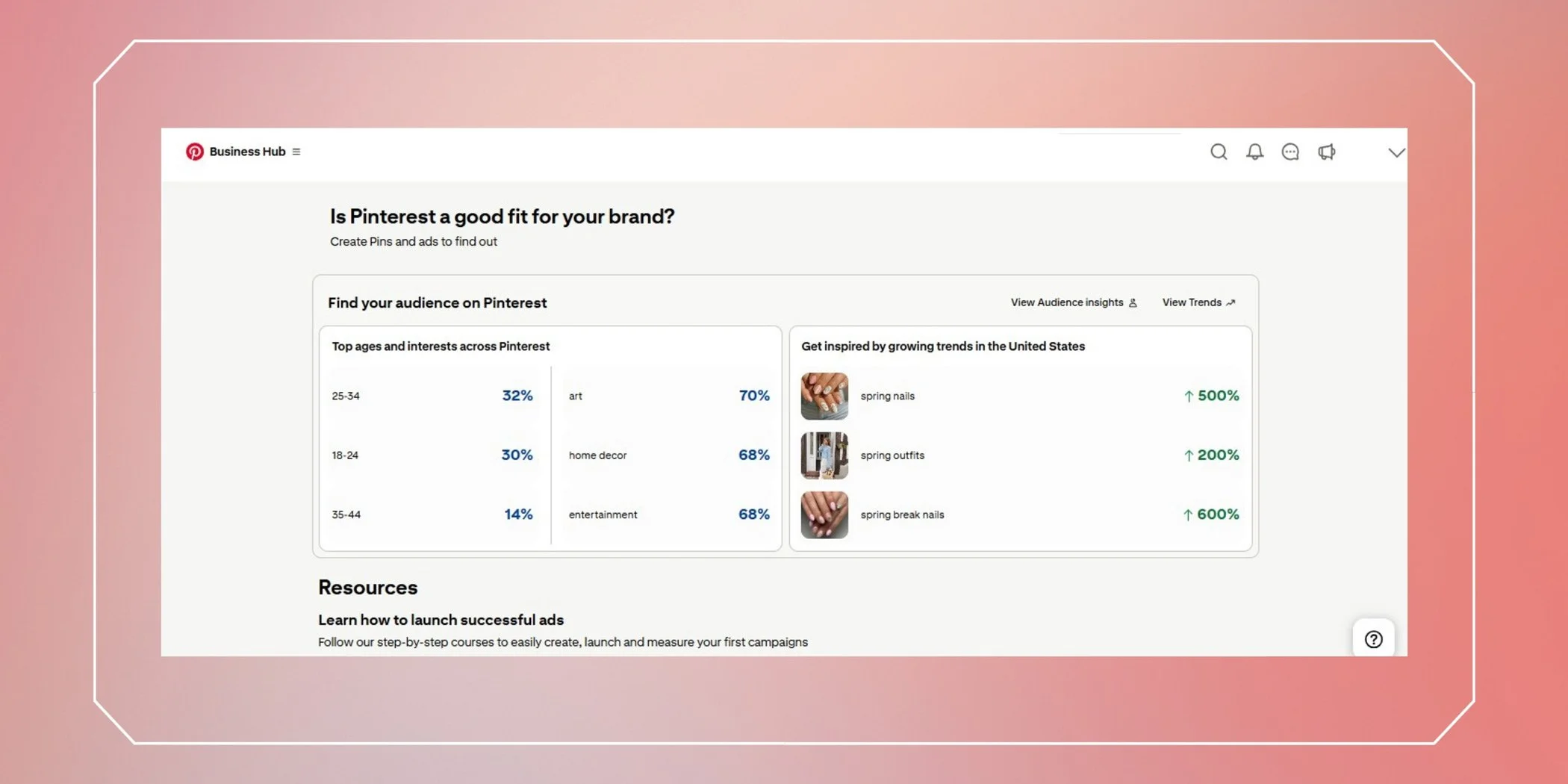
A business account on Pinterest gives you access to business tools: analytics, audience insights, advertising, and merchant features, so you can see exactly what pins are hitting the target. The perfect setup.
In short, the better data you have, the easier it becomes to refine your strategy and create content your audience actually wants.
The Best Part? It’s Free.
You can start building visibility and traffic without paying for ads.
Basically, it’s time to start a business account on Pinterest.
How To Create a Business Account on Pinterest
Step 1: Sign Up
Head over to Pinterest.com and click “Sign up.” Already have a personal account? Log out first so you can start fresh with your business profile.
🌟Pro Tip: Using a desktop computer will make setting up your account much easier!
Step 2: Create Your Business Account
Click “Create a free business account” and input your email, password, and birthdate.
Step 3: Build Your Profile
Your Pinterest business profile should instantly communicate who you are and what your brand does.
Add your business name, logo, website, country, and language. Pretty straightforward.
Also, be sure to add your bio. Include keywords related to your niche naturally so Pinterest better understands your content and audience.
Example: “Interior design studio specializing in luxury home design, modern interiors, custom renovations, and curated spaces.”
🌟Pro Tip: Use your logo as your profile pic for easy recognizability!
Step 4: Describe Your Business
Pinterest will ask about your goals. Are you selling products? Driving site traffic? Boosting brand awareness?
Pick the options that best fit your brand so Pinterest knows who to show your content to.
🌟Pro Tip: The more details you provide, the better Pinterest can categorize your account!
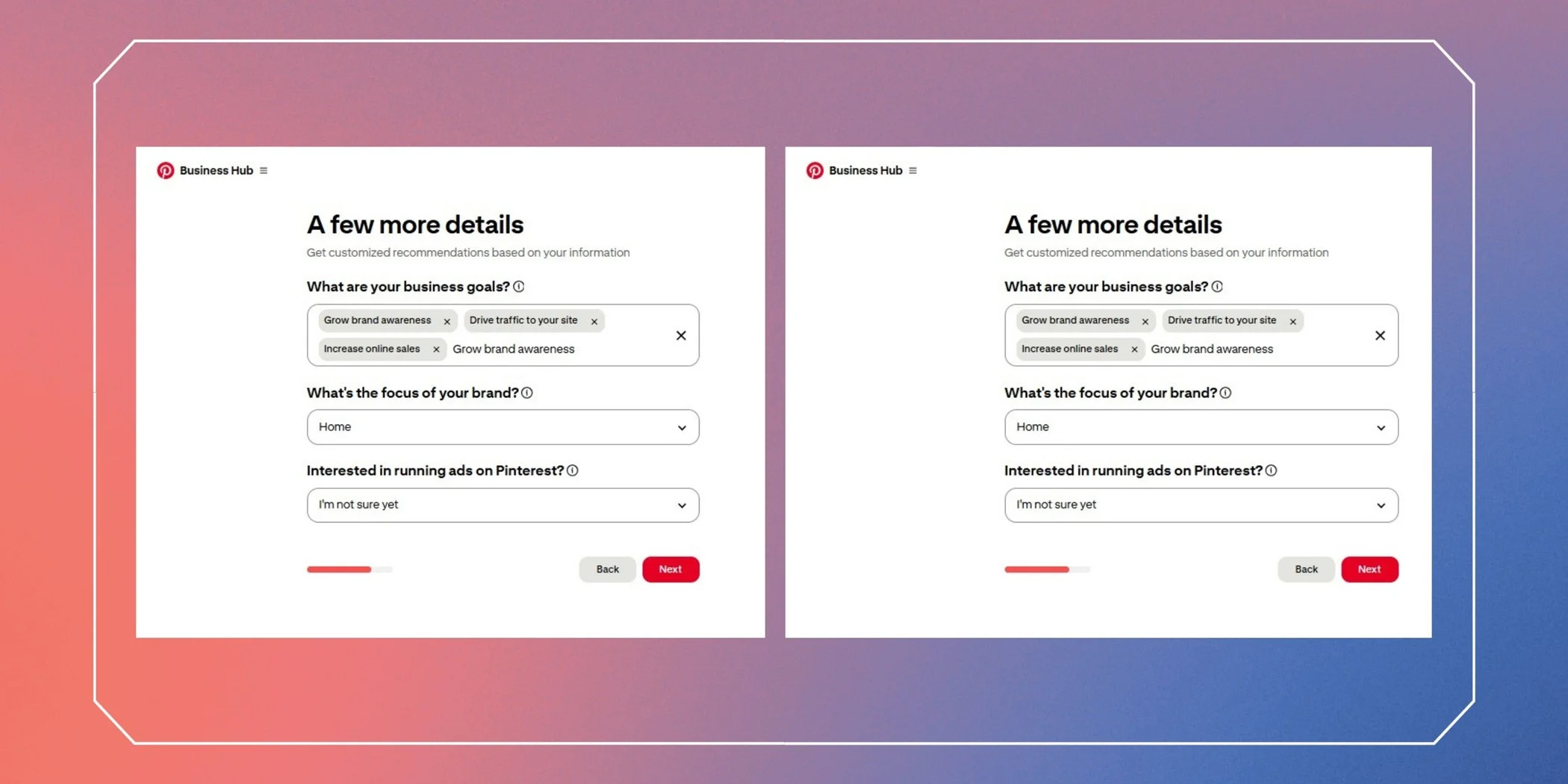
Step 5: Run Ads… Or Not
Pinterest gives you the option to start advertising right away. Don’t worry if you’re not ready.
Skip it for now and focus on building your organic content first. You can always come back to this later once you understand what content performs best.
Organic Pinterest growth is still incredibly valuable!
Optimizing Your Business Account
The key to Pinterest success is search engine optimization (SEO).
Pinterest wants context. The more information you provide through keywords, board names, descriptions, and pin copy, the easier it is for the algorithm to understand your content and serve it to the right audience.
These next steps will help you optimize your Pinterest business account for visibility and growth.
Step 6: Claim Your Website
Go to settings → claim website.
This step unlocks analytics, adds your logo to pins from your site, and helps your content show up in people’s search results.
Claiming your website also builds trust and authority for your account.
▶️ This step tends to confuse people the most, so here’s a simple tutorial video from a Pinterest creator on how to claim your website:
Step 7: Start Pinning
Create boards that make sense for your brand and begin pinning content consistently.
We’ll preach this forever: quality > quantity. Always.
Fresh pins with valuable content keep your audience engaged, attract new followers, and help grow accounts sustainably.
🌟Some Pinning Pro Tips:
Avoid “spammy” behavior. Don’t post excessively in short periods of time or repost the same thing repeatedly. Pinterest can restrict or ban accounts that appear automated or low quality.
If you use affiliate marketing, don’t link directly to affiliate offers. Instead, use a buffer page like linking users to a landing page, blog post, YouTube video, etc.
Create your own pins! Avoid copyright issues by using licensed or royalty-free photography, custom graphics, and branded visuals. And please… don’t steal other people’s work.
Use searchable keywords naturally in:
Pin titles
Pin descriptions
Board names
Board descriptions
Image file names
Check out The Schmidty Wife’s Pinterest account (one of our awesome clients) and see how her account is optimized for her niche: food blogging.
Her board titles are specific, her content is high-quality, original, and consistent, she connects with other creators, and her account is filled with regularly searched keywords related to recipes, meal prep, and family cooking.
Step 8: Use Pinterest Analytics Tools
Your business account on Pinterest comes with tools that help you level up over time.
Use your analytics dashboard to track:
Top-performing pins
Website clicks
Saves
Audience engagement
Monthly viewers
Outbound traffic
Merchant tools are also incredibly useful if you sell products. Pinterest can showcase your products directly within the platform, making it easier for users to shop.
🌟 Pro Tip: Check the Business Hub often – it is full of relevant data and how-tos!
Common Pinterest Mistakes to Avoid
A few things that can hurt your Pinterest growth:
Using vague board titles like “Inspo” or “Ideas”
Posting blurry or low-quality graphics
Ignoring keywords and SEO
Pinning inconsistently
Overusing trends that don’t align with your brand
Linking to broken pages
Posting only promotional content with no value
Pinterest rewards helpful, searchable, evergreen content.
The goal is to become a trusted resource in your niche.
Ready to Make Pinterest Work for You?
Pinterest is an incredible marketing tool, but like anything else, it does take time, strategy, and a little know-how.
At Scott Social we focus on marrying aesthetics with metrics to help brands grow intentionally. From Pinterest strategy to social media management to content creation, we help brands create content that actually connects.
Your Pinterest success story starts here.
FAQs About Pinterest Business Accounts
-
Yes. A Pinterest business account is completely free and includes access to analytics, business tools, and advertising features.
-
Yes. Pinterest allows you to convert an existing personal account into a business account through your settings.
-
Pinterest helps businesses increase website traffic, improve brand visibility, and reach users actively searching for ideas, products, and services.
-
Consistency matters more than volume. Aim for consistent, high-quality pinning instead of excessive posting.
-
A business account includes analytics, advertising tools, website claiming, audience insights, and merchant features that personal accounts do not offer.
WRITTEN BY:
Hailey Johnston
Social Media Strategist